Entanglement view
Starting from server version 1.0.26, Quantag Studio provides an Entanglement section in the Variables panel during circuit debugging.
After executing a step (F10) or stopping at a breakpoint, two variable groups are shown:
Quantum State – amplitudes of the current quantum state
Entanglement – quantitative entanglement information
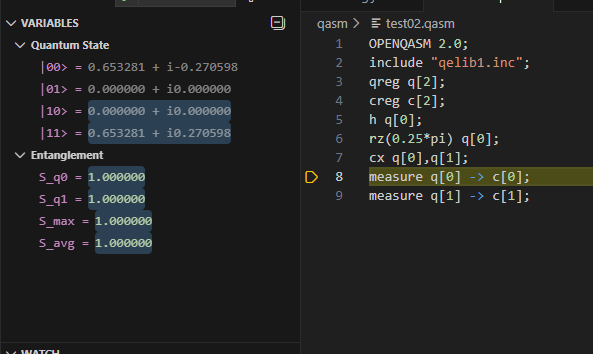
What is shown in Entanglement
For each qubit qi, the entanglement section shows a value:
S_qi
where S_qi is the von Neumann entropy of qubit qi with respect to the rest of the system.
Interpretation:
S_qi = 0.0– the qubit is not entangled (separable state)0.0 < S_qi < 1.0– the qubit is partially entangledS_qi ≈ 1.0– the qubit is maximally entangled with the rest of the system
The following summary values may also be displayed:
S_max   – maximum entanglement among all qubits
S_avg   – average entanglement over all qubits
Notes
Entanglement values are updated only when execution stops (step or breakpoint).
Entanglement is computed from the current quantum state before measurement.
After a measurement operation, entanglement typically collapses to zero.
Controlled gates (for example
cx) create entanglement only if the control qubit is in superposition.
Example
The following OpenQASM code does not create entanglement:
h q[0];
cx q[1], q[0];
The following code creates entanglement:
h q[0];
cx q[0], q[1];